

Troubleshooting
This page collects the issues you're most likely to hit and how to resolve them. It's organized by the stage where the problem appears.
ESP CloudHub in your own AWS account
The ESP CloudHub stack failed
The esp-cloud-hub stack shows ROLLBACK_COMPLETE.
- Open the stack's Events tab. The first CREATE_FAILED event's Status reason says why. Most often it's an AdminTemporaryPassword missing an uppercase letter, lowercase letter, number or symbol.
- Delete the
esp-cloud-hubstack. If a stack namedesp-rainmaker-installer-stackexists, delete it too. - Start again from Step 2.
An administrator lost the temporary password, or it expired
The temporary password is valid for 7 days, and Forgot password? only works after the first sign-in. Someone with access to the AWS account can set a new temporary password with the AWS CLI:
aws cognito-idp admin-set-user-password --region us-east-1 \
  --user-pool-id <CognitoUserPoolId> \
  --username <administrator email> \
  --password '<new temporary password>' --no-permanent
<CognitoUserPoolId> is in the esp-cloud-hub stack's Outputs tab. The administrator signs in with the new temporary password and is asked to set their own.
I can't find my ESP CloudHub address
Open the esp-cloud-hub stack in CloudFormation (region us-east-1) → Outputs → DashboardUrl.
Sign-in & organization
I don't have an account. On the login screen, click Need an account? Sign up to register. Your organization is created automatically the first time you log in.
"Select an active organization…" You belong to more than one organization and none is active. Use the organization switcher in the top navigation to choose one, then retry the action.
I can see the console but most actions are disabled. A new member has minimal access until an admin assigns a role. Ask your organization's admin to grant you the appropriate role (see Roles & access).
Connecting your AWS account
"You do not have permission to connect this account…"
Your role lacks the connect permission (tenant:connect) in the current organization. Ask an admin to grant it, or switch to an org where you have it.
AssumeRole: the connection fails right after Confirm & Continue.
Usually the CloudFormation stack isn't finished, or the role was created in the wrong account. Confirm the ESPDeploymentTrustRole stack shows CREATE_COMPLETE in the same 12-digit tenant account you registered, then click Confirm & Continue — try again. Make sure you weren't signed in to a different AWS account when you ran the setup link.
AssumeRole: the setup link opened the wrong account. The link must be opened while signed in to the tenant account. Switch accounts (or log out and back in) in the AWS console, then re-open the copied setup link.
SSO: "SSO accessToken has expired. Please re-login." SSO connections are valid for about 8 hours. When one expires, ESP CloudHub can't deploy until you reconnect. Open the tenant, choose AWS SSO, and repeat the authorize flow (Start URL → Authorize → Allow → select role). If you'd rather not deal with expiry, switch the tenant to AWS Trust Role, which does not expire.
SSO: the authorize page didn't grant access. On the AWS "Allow access to your data?" screen you must click Allow (not Cancel). If you cancelled, restart the SSO flow and click Allow.
General connect failure / want to start over. Click Try Again to return to the method picker, or Change connection method to switch between AWS Trust Role and AWS SSO, then retry.
Account setup (prerequisite checks)
Deployment is locked / "Create Deployment" won't proceed. Deployment stays locked until all mandatory checks pass. Open Account Setup, run Begin Validations, and clear every mandatory item. Optional items can be skipped; mandatory ones cannot.
A check still shows as failing after I fixed it in AWS. AWS changes take time to propagate. Click Refresh Status on the Setup page, or Run Diagnostics on the Configuration page, to run the checks again against your AWS account — this works also after setup is finished. You can re-check every 5 minutes. If a limit increase required an AWS support case, approval typically takes 1–3 business days — re-check periodically.
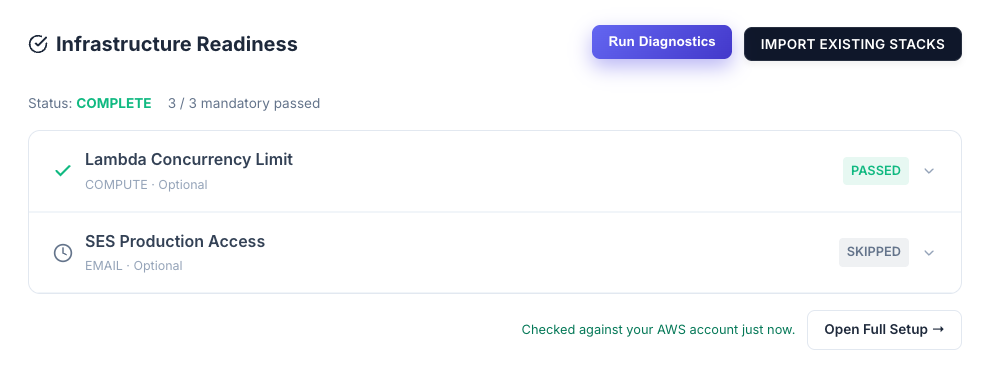
The Lambda concurrency check fails although I raised the quota to 1000. Quotas are per region. The check reads the deployment region and shows it, for example concurrent_executions: 10 in us-east-1. Make sure the increase is applied in that region (Service Quotas → AWS Lambda → Concurrent executions), then run the check again as described above. If you skipped the check earlier, it turns Passed once the new quota is detected.
"no domain identities found" on SES Domain Verification + DKIM. This is an optional (non-blocking) check. Without domain verification, RainMaker emails may be marked as spam and OTPs can be missed. Fix it via Open AWS Console (verify your domain and enable DKIM in SES), or Skip this step for now and address it before production.
"Request access" or "Access Denied"
The ESP RainMaker Classic card shows a Request access button instead of Manage, or the deploy wizard's Version step shows Access Denied — "You do not currently have the required access to deploy ESP RainMaker Classic yet."
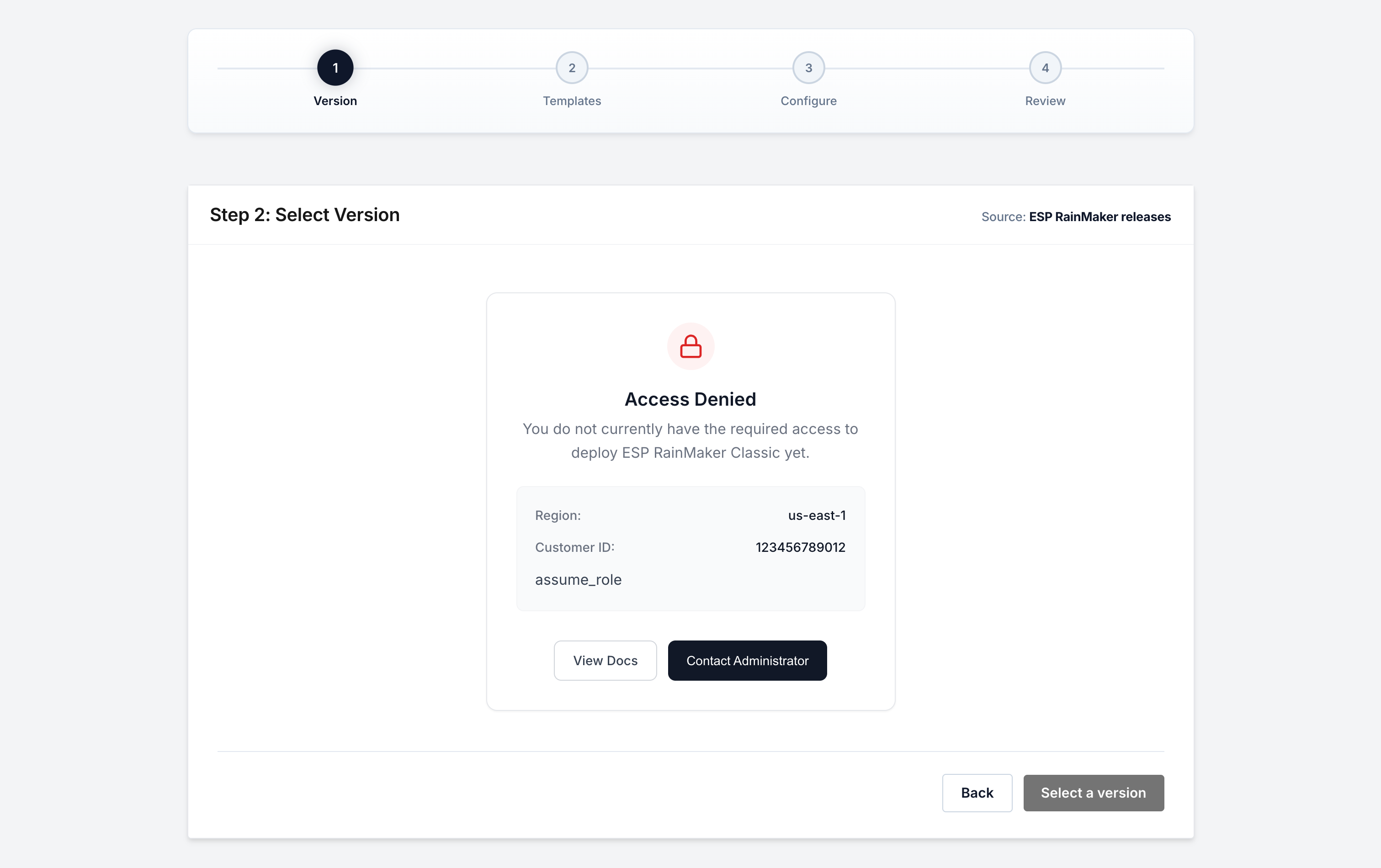
Espressif hasn't enabled ESP RainMaker releases for this AWS account yet. Request access as described in Get access to ESP RainMaker releases. Access is per AWS account.
If you already have access and still see this:
- Check the AWS account is connected, not only added.
- For AWS SSO, the session may have expired (about 8 hours) — reconnect.
- For AWS Trust Role, check the
ESPDeploymentTrustRolestack still exists in that account.
The Setup page shows S3 Bucket Access Denied. Same cause and same fix as above — the message mentions a bucket policy in your account, but nothing needs to change in your account.
Importing existing stacks
My Voice Assistant stacks are named StackSet-….
That is how the Voice Assistant guide installs it. ESP CloudHub finds these and imports them under ESP RainMaker Voice Assistant, one per region. Don't map them to Nested Add-ons — ESP CloudHub blocks that. See Voice Assistant installed as a StackSet.
A component I deployed isn't detected. Look for it in that row's list: stacks ESP CloudHub recognises are labelled "Looks like: …" and listed first. If your AWS access can't read stack templates, only standard and guide names are recognised — pick your stack from the list. See Common cases.
The setup page said "Ready for a fresh deployment", but RainMaker is already in this account. Your stacks have custom names ESP CloudHub couldn't recognise. Don't click Continue to deploy — click Find my stacks, pick the version you deployed, and choose your stacks. See Nothing was found, but RainMaker is there.
The setup page asks which version I deployed. Either your AWS access can't read the stacks' CloudFormation templates, or the templates don't show a version (for example, a customised template); the page says which. Pick the version you deployed. If it's an access problem, you can instead connect with a permission set that can read templates. See If the version can't be read.
Deploy wizard
"Please visit all selected templates before reviewing." You clicked Review without opening the Configure page for every selected stack. Use Previous / Next Template to visit each one, fill its parameters, then return to Review.
Validation dialog lists missing parameters. Some stacks have required parameters with no defaults. Navigate to the named stack, fill the highlighted field, and try again. Password (NoEcho) fields must meet complexity rules (≥8 chars, upper + lower + symbol).
A stack failed during deployment. Deployment stops at the failing stack. Open it to read the status reason. Common causes: an invalid parameter value, or an AWS quota that's too low (Lambda concurrency, SES/SNS limits). Fix the cause and retry the deployment.
Upgrades
The version I want isn't in the list. The upgrade list shows only versions at or above your current one — downgrades aren't supported. If a version is missing, it may be below your current version, or not yet published.
Old parameters appear (or disappear) in the upgrade. On upgrade, parameters are pre-filled from your existing deployment and filtered to the new version's schema. Parameters removed in the new version are dropped automatically; new stacks must be configured fresh.
Can I remove a stack during an upgrade? No. All previously deployed stacks carry forward — partial upgrades and stack removal aren't supported.
Common questions
Which ESP CloudHub should I use? If you don't need ESP CloudHub itself to run in an AWS account you control, use the Espressif-hosted one — there's nothing to set up. Either way, RainMaker is deployed into your AWS account.
Which ESP CloudHub version am I on? Look at the badge next to ESP Cloud Hub in the top bar, or at the dashboard header, which also says whether you're up to date. Any signed-in user can see it. See Which ESP CloudHub version am I on?.
Which ESP CloudHub version should I deploy? The one marked Latest on ESP CloudHub Releases.
Which ESP RainMaker version can I deploy? Any version from 3.6.0 onwards; you choose it in the deploy wizard. See the Dependency Table.
Which AWS region?
Your own ESP CloudHub runs in us-east-1. RainMaker goes to the region you pick when you add your AWS account. If the deploy wizard lists no versions for a region, contact support.
How long does it take? Your own ESP CloudHub: about 10 minutes. ESP RainMaker: usually under an hour. Amazon SES production access from AWS: usually 1–3 business days — request it early.
Still stuck?
Email esp-rainmaker-support@espressif.com with the step you were on, the exact message you saw, your AWS account ID and the region.