

Third-party Login Configurations
ESP RainMaker uses Amazon Web Services to provide RESTful APIs for authentication, authorization and user management in mobile apps. These APIs also enable communication with devices. Additionally, ESP RainMaker supports login using Google and Apple ID accounts.
Enabling third-party login and authentication in the mobile app involves a two-step process: configuring deployment settings and enabling the feature on the mobile app.
Deployment Configurations
Please follow the steps in the deployment guide to enable and configure the ESP RainMaker third-party login using the Google Console, Apple Developer account, and the ESP RainMaker Dashboard.
App Side Configurations
In addition to the deployment settings, the app code also requires configuration to set the redirect URL. Refer to the Android Configurations and iOS Configurations sections for more details.
You will have to change the authUrl and other parameters like clientId and redirectUrl as per your deployment in the rainmaker.config.ts file.
| Key | Type | Description |
|---|---|---|
| clientId | String | Uniquely identifies an app in a user pool. Check steps to get the Client ID. |
| authUrl | String | OAuth URL for third party login. Check steps to get the Authentication URL. |
| redirectUrl | String | Custom URI schemes needed for redirecting user back to your app after third party login is completed. You also need to copy this value into rainmaker.config.ts file, see below. |
Android Configurations
If you are building an Android app, supporting third-party logins requires completing the following steps in the Android-specific files.
Setup Redirect URI
To set up redirect URI for your app, you need to write your application ID as a host available in the data tag in AndroidManifest.xml file.
Here is an example of redirect URI for the ESP RainMaker app:
<data
  android:host="com.espressif.novahome"
  android:path="/success"
  android:scheme="rainmaker" />
Redirect URI for ESP RainMaker Home app will be:
rainmaker://com.espressif.novahome/success
Replace com.espressif.novahome with your application ID in the above data. So redirect URI for your app will be:
rainmaker://your_application_id/success
iOS Configurations
If you are building an iOS app, supporting third-party logins requires completing the following steps in the iOS-specific files.
Add URL Scheme
App Bundle ID should be included in the Info.plist file of the ESP RainMaker Home Project. Go to ESPRainMaker > Info Tab. Scroll down to URL Types and expand. Add your URL scheme as shown below.
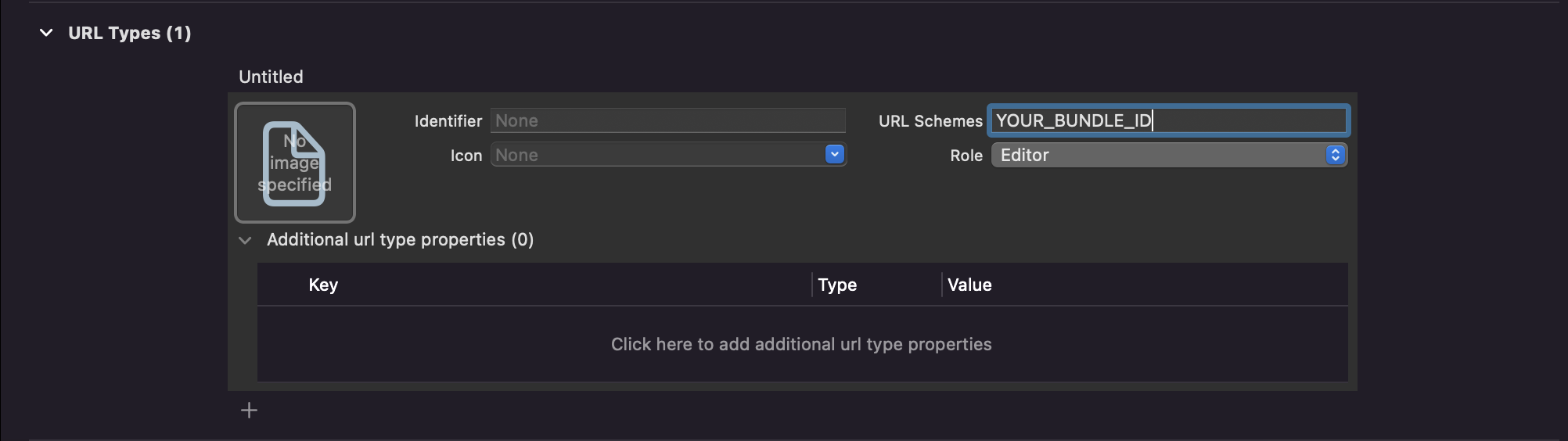
Creating Redirect URL
Redirect URL for ESP RainMaker Home app will be:
com.espressif.novahome://success
Replace com.espressif.novahome with your application Bundle ID in the above data. The redirect URL for your app will be:
com.your_application_id.app://success