

Group Sharing & Node Group
ESP RainMaker Node Group is a feature that enables users to organize and manage IoT devices efficiently.
What is a Node Group?
A Node Group is a logical collection of nodes. These groups help users organize the nodes based on location (e.g., “Living Room Devices”), function (e.g., “All Lights”), or metadata (e.g., “Model: X123”).
- Groups can be static (nodes explicitly listed) or dynamic (based on node model/type/firmware).
- Hierarchical grouping is supported: groups can have sub-groups up to three levels deep.
What is Group Sharing?
Group Sharing enables users to collaborate by sharing node groups with others. It allows multi-user to interact with the same set of physical nodes, facilitating shared access and control within a group. You can share a group with others using two access levels:
- Primary access: Full control, including the ability to update, delete, and share the group with additional users.
- Secondary access: Limited control, allowing users to view the group and perform basic operations.
The feature provides:
- Hierarchical organization of nodes into groups.
- Dynamic node grouping based on node attributes such as node type, model, or firmware version.
- Node control & sharing capabilities between users.
- Matter fabric support for Matter-enabled devices (nodes). See Matter Fabric Support.
- Admin User and End User level node group management.
Use Case
Node Groups solve several key challenges in IoT device (node) management:
| Use Cases | Description |
|---|---|
| Organization | Helps users organize multiple nodes logically (e.g., by room, function, or location). |
| Bulk Operations | Enables performing operations on multiple nodes simultaneously. |
| Access Control | Facilitates sharing node access with other users with different permission levels. |
| Dynamic Management | Allows automatic grouping of nodes based on their attributes. |
| Matter Integration | Supports Matter protocol devices (nodes) alongside RainMaker device (nodes). |
| OTA Management | Enables efficient firmware updates for groups of nodes. |
Entities Involved
Users Roles
Admin Users
Can create and manage admin node groups.
End Users
Can create and manage user node groups.
-
Primary User
- Owner of the device group.
- Has full control over sharing settings.
- Can add/remove secondary users.
- Can modify sharing permissions.
-
Secondary User
- Recipient of shared access.
- Limited permissions based on role.
- Can view and/or control shared nodes.
- Cannot modify sharing settings.
Node
An IoT Node registered on ESP RainMaker, identified by unique node IDs.
- RainMaker Nodes: Standard ESP RainMaker nodes.
- Matter Nodes: Matter protocol-enabled nodes.
Groups
- Admin Node Group: Node group created by the admin users.
- User Node Group: Node group created by the end users.
- Matter Fabric: Matter fabric can be created by end users using the node group APIs and it can contain matter as well as RainMaker nodes. See Matter Fabric Support for the overall solution.
- Dynamic Groups:
- Group Query Based Groups: Only Admins can create these groups by providing either or all of the
node_type,node_modelandnode_fw_version. These groups will then take the existing nodes according to their node config values and admin can use this dynamic groups for sending OTA jobs. - Regroup: Regroup operation is applicable to only group query based groups. If a group is created based on a
group_queryand some nodes' type, model or firmware version is changed, then the regroup option removes nodes which no longer satisfy thegroup_queryand adds newly added/updated nodes which match thegroup_query.
- Group Query Based Groups: Only Admins can create these groups by providing either or all of the
Usage Guide
Group Sharing API Usage
Share Groups: PUT /v1/user/node_group/sharing
-
Share as Primary User
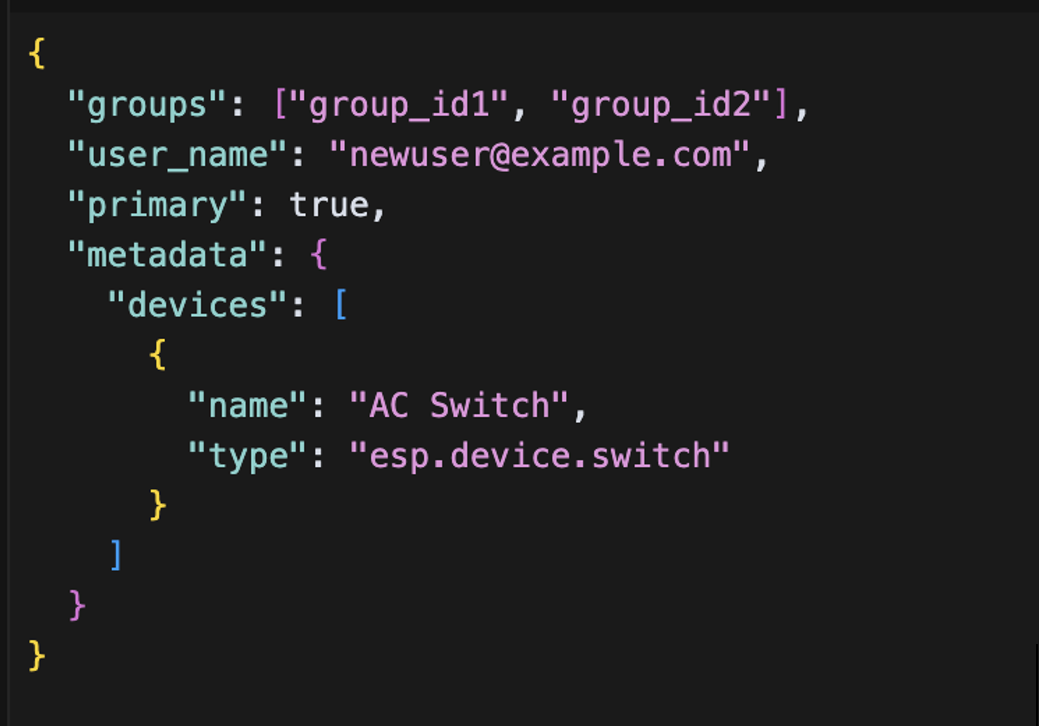
Purpose: Share groups with another user as a primary user, giving them full control.
- The recipient becomes a primary user of the shared groups.
- They get full control over the nodes in these groups.
- They can further share these groups with others.
-
Share as Secondary User
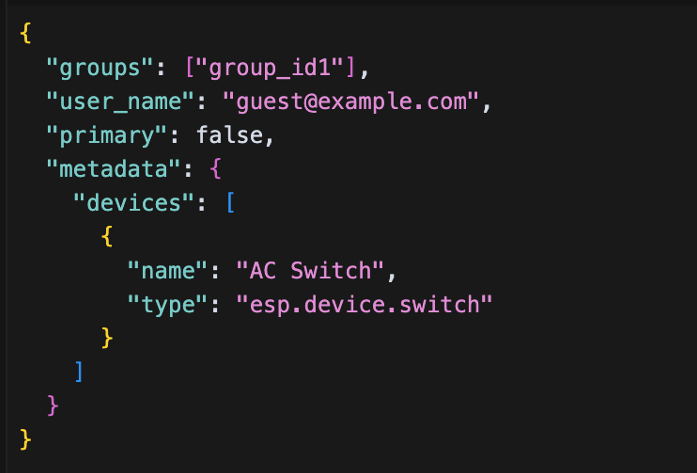
Purpose: Share groups with view-only access.
- The recipient becomes a secondary user.
- They can only view and monitor nodes.
- Cannot modify nodes settings or share further.
-
Transfer Primary Ownership
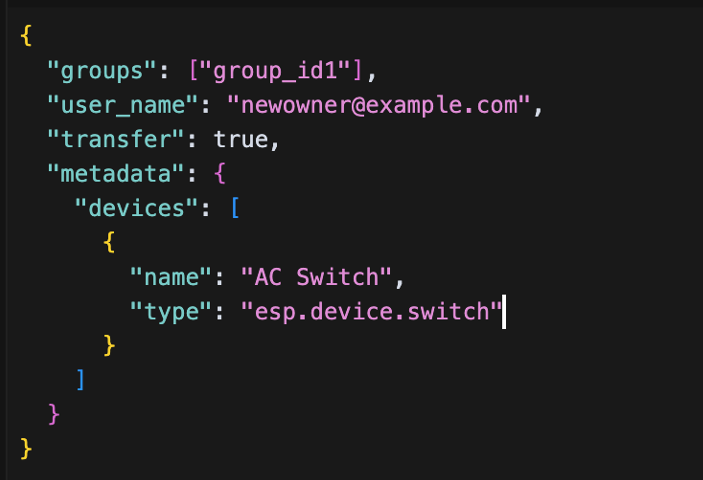
Purpose: Transfer complete ownership of groups.
- Current user loses primary access.
- Recipient becomes the new primary user.
- Current user loses all access to the group.
-
Transfer and Retain Secondary Access
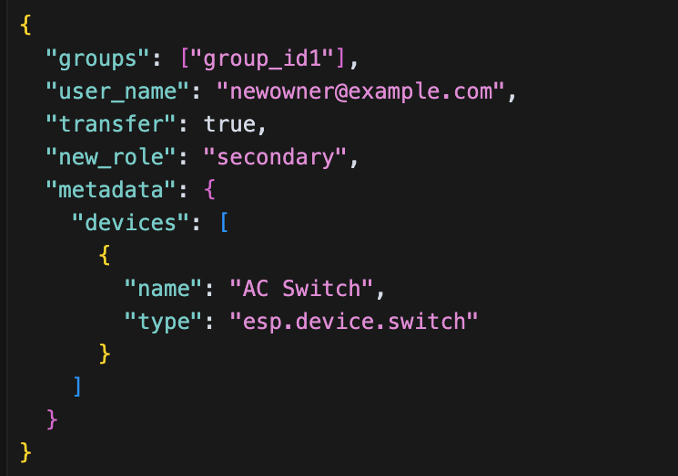
Purpose: Transfer ownership while maintaining view access.
- Current user becomes secondary user.
- Recipient becomes primary user.
- Current user retains view-only access.
Get Sharing Details GET /v1/user/node_group/sharing
| Query Type | Method | Endpoint | Description |
|---|---|---|---|
| i. Basic Query | GET | /v1/user/node_group/sharing | Returns all groups the user has access to (both primary and secondary). |
| ii. Query with Group ID | GET | /v1/user/node_group/sharing?group_id=group_id1 | Returns sharing details for a specific group. |
| iii. Query with Subgroups | GET | /v1/user/node_group/sharing?sub_groups=true | Returns sharing details including all subgroups. |
| iv. Query with Parent Groups | GET | /v1/user/node_group/sharing?parent_groups=true | Returns sharing details including parent groups. |
| v. Query with Metadata | GET | /v1/user/node_group/sharing?metadata=true | Returns sharing details including metadata set during sharing. |
Manage Sharing Requests
-
Get Sharing Requests
GET v1/user/node_group/sharing/requestsThis API allows the primary and secondary users to get the sharing requests.
Parameters
request_id: Get specific request.primary_user: This is a boolean flag, which is used to denote whether to get the requests raised by primary user (true) or received by secondary users (false). Default value for this flag is false.start_request_id: used in pagination.start_user_name: used in pagination along withstart_request_id.num_records: used to specify the no of records that must be returned. Default value is 10. The valid values are in the range of 1 to 10. If invalid value is given, default value is used.
-
Accept/Decline Request
PUT /v1/user/node_group/sharing/requestsUsed to accept or decline a group sharing requests.
-
Delete Sharing Request
DELETE /v1/user/node_group/sharing/requests?request_id=request_id1Removes a pending sharing request.
Delete Node Group DELETE /v1/user/node_group
This API will delete user node group/matter fabric if user is primary.It allows the users to leave from their own groups/matter fabric. It also allows primary users to remove the sharing for other users.
Parameters
group_id(required)leave(boolean):- Primary/secondary users can specify this parameter to leave the group.
- If the user is the only primary user of the group then the user cannot leave the group. Delete the group instead.
- If there are multiple primary users of the group, then the user can leave the group using the query param.
- For secondary users, it will be
trueby default if nothing is specified.
remove_sharing(boolean): remove_sharing should be used withuser_name.- Used to remove sharing of the
user_namespecified. - Secondary users cannot perform this operation.
- Username for which sharing needs to be removed and the requesting username cannot be the same. Please use
leaveinstead. - A cannot unshare groups that were shared via parent group.
remove_sharingandleaveare not allowed together.
- Used to remove sharing of the
user_name(string):user_nameof the user for which sharing needs to be removed.
Assumptions
- Each group has at least one primary user.
- Maximum 100 nodes can be added per group in a single request.
- Matter devices (nodes) can only be added to Matter Fabrics.
- Dynamic groups automatically update when node attributes change.
- Only admin users can create dynamic groups.
- Dynamic groups cannot have subgroups.
- Dynamic groups are mutually exclusive with static groups.